Programmatic Authentication
Two credential types reach Openlane APIs outside the console: organization-scoped API Tokens for integrations and automation, and user-scoped Personal Access Tokens (PATs) for personal tooling.
API Tokens
API Tokens are organization-scoped credentials designed for system integrations, automation, and service-to-service communication. Access is controlled through configurable scopes that define read, write, and delete permissions for each object type across the organization.
To create any tokens, your organization must have a payment method on file.

Scopes
Permissions are granted per object type using the format object:action. Each object supports up to three actions:
| Action | Effect |
|---|---|
read | Retrieve records of this object type |
write | Create and update records of this object type |
delete | Delete records of this object type |
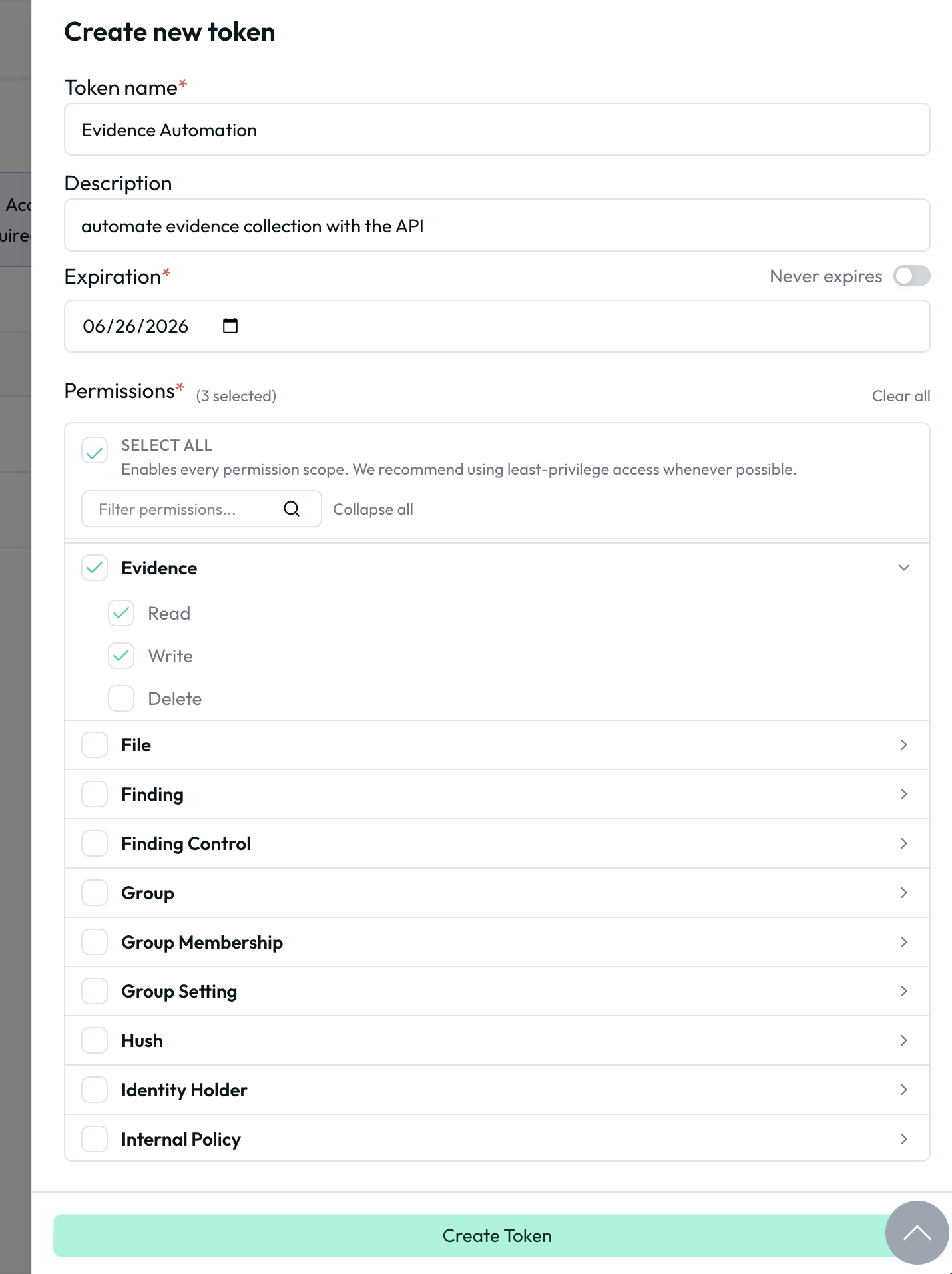
For example, a token with evidence:read and evidence:write can read and create evidence but cannot delete it. Scopes are displayed as chips on the token list and can be filtered in the permission selector when creating a token.
We recommend following the principle of least privilege: grant only the minimum scopes required for the job or workflow. A token used for automated evidence collection only needs evidence:read, evidence:write, and the read scope for any related objects it queries.
Creating an API Token
-
Navigate to Organization Settings > Developers > API Tokens
-
Click Create
-
Name the token and set an Expiration. Every production token should have one; Never expires is for break-glass cases you have a rotation plan for
-
Under Permissions, expand each object type and select the actions the token should be allowed to perform. Use the search box to filter by object name, or click SELECT ALL to enable every scope (not recommended for production tokens).
-
Click Create Token and copy the token value immediately; it is only shown once.
-
If your organization enforces SSO, authorize the token for SSO access after creation.
Using the API Token
Include the API token in the Authorization header of your HTTP requests:
Authorization: Bearer tola_YOUR_API_TOKEN
Personal Access Tokens
PATs provide user-specific programmatic access to Openlane APIs. They inherit the permissions of the user who created them and are intended for personal automation, development tools, and user-specific integrations.
Creating a Personal Access Token
- Navigate to Developer Settings in the Openlane console
- Select Personal Access Tokens from the sidebar
- Click Create
- Name the token, select the Authorized Organizations it can access (a PAT works across every organization you authorize it for), and set an expiration
- Click Create Token and copy the token value immediately; it is only shown once
- If a selected organization requires SSO enforcement, authorize the token for SSO access
Using the Personal Access Token
Include the PAT in the Authorization header of your HTTP requests:
Authorization: Bearer tolp_YOUR_PERSONAL_ACCESS_TOKEN
When using a PAT that is authorized for multiple organizations, ensure the owner_id is always included in the request, or add the X-Organization-ID header to specify which organization context to use for the request.
Additional Information
For more details on tokens, including properties, GraphQL operations, and security considerations, refer to the developer documentation.